Table of Contents
- What Is a Telegram Channel?
- Example Use Cases for Channels
- What Is a Telegram Group?
- Example Use Cases for Groups
- Telegram Channels vs Groups Feature Comparison
- Visibility Differences
- Channel Visibility
- Group Visibility
- Admin Controls Compared
- Channel Admin Controls
- Group Admin Controls
- Searchability and Discovery
- How to Choose Between a Channel and a Group
- Choose a Channel If You Want To:
- Choose a Group If You Want To:
- Can You Use Both Together?
- Common Mistakes to Avoid
- Conclusion
- FAQ
- What is the difference between a Telegram channel and a group?
- Can a Telegram channel have comments?
- Which is better for business communication?
- Are Telegram channels searchable?
- Should I create both a channel and a group?
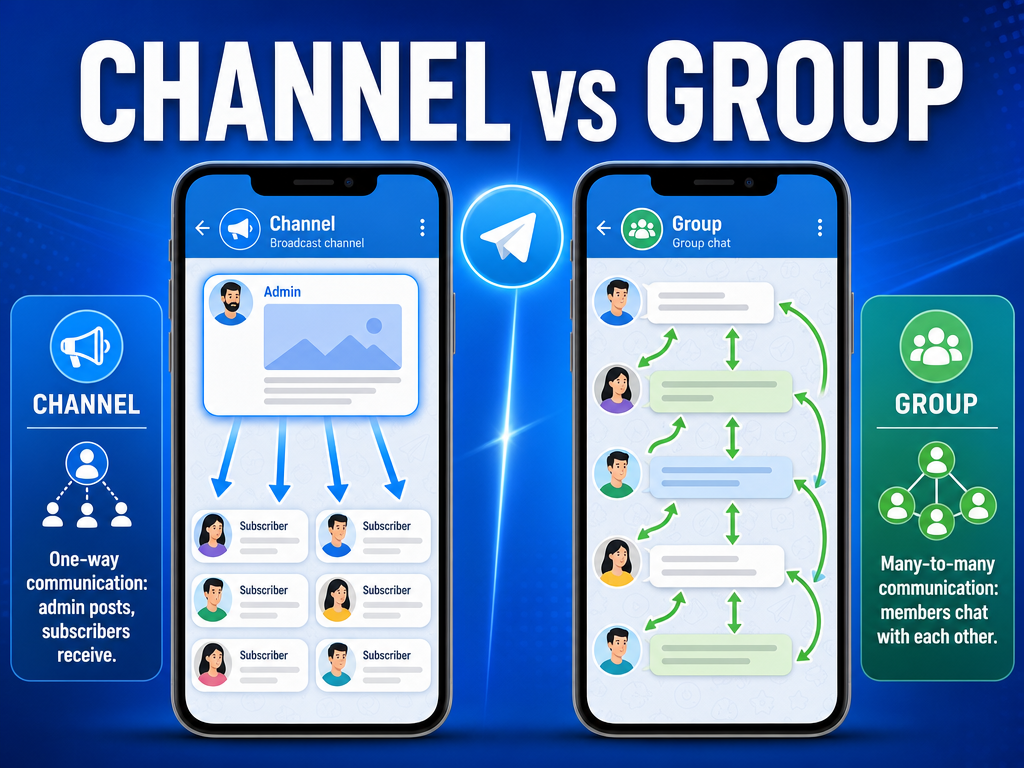
If you are comparing Telegram channels vs groups, the short answer is simple: a Telegram channel is designed for one-way broadcasting to an audience, while a Telegram group is built for conversations and community interaction. Channels work best for announcements, news, and content distribution. Groups are better for discussions, support communities, teams, and member engagement.
To get started, you can download Telegram and explore both features directly. Understanding the differences will help you choose the right format for your audience and goals.
What Is a Telegram Channel?
A Telegram channel is a broadcasting tool where administrators publish messages to subscribers. Followers can receive updates, but they typically cannot post messages themselves unless specific discussion features are enabled.
- Designed for one-to-many communication
- Unlimited subscribers
- Content appears as official announcements
- Ideal for news, updates, marketing, and content distribution
- Can be public or private
Example Use Cases for Channels
- Company announcements
- News publications
- Educational content delivery
- Product updates
- Influencer broadcasts
What Is a Telegram Group?
A Telegram group is a collaborative chat space where members can communicate with each other. Groups support discussions, file sharing, polls, and community engagement.

- Designed for many-to-many communication
- Supports large communities
- Members can send messages and media
- Encourages interaction and collaboration
- Can be public or private
Example Use Cases for Groups
- Customer support communities
- Study groups
- Team collaboration
- Interest-based communities
- Event planning
Telegram Channels vs Groups Feature Comparison
| Feature | Telegram Channel | Telegram Group |
|---|---|---|
| Primary Purpose | Broadcasting information | Community discussions |
| Member Interaction | Limited | High |
| Posting Rights | Mainly admins | All members (unless restricted) |
| Visibility of Members | Subscribers are generally not visible to others | Members can see other members |
| Admin Controls | Strong content control | Moderation-focused controls |
| Searchability | Public channels can be discovered via search | Public groups can also appear in search |
| Best For | News, announcements, content publishing | Discussions, support, collaboration |
Visibility Differences
Visibility is one of the biggest distinctions between a Telegram group vs channel.
Channel Visibility
- Subscribers mainly consume content
- Member lists are generally not publicly emphasized
- Focus stays on published content
- Suitable for audience privacy and content distribution
Group Visibility
- Members can interact openly
- User profiles and messages are visible within the group
- Conversations become part of the community experience
- Better for relationship building and networking
Admin Controls Compared
Telegram offers powerful management tools, but channels and groups use them differently.
Channel Admin Controls
- Publish and edit content
- Schedule posts
- Manage subscriber access
- Assign multiple administrators
- Maintain strict content quality and consistency
Group Admin Controls
- Approve or remove members
- Restrict messaging permissions
- Delete inappropriate content
- Manage spam and moderation rules
- Assign moderator roles
For organizations that require complete control over messaging, channels are usually easier to manage than large discussion groups.
Searchability and Discovery
Both public channels and public groups can be discovered through Telegram search. However, discoverability often depends on naming, activity levels, and whether the community is public or private.
- Public channels can attract subscribers looking for information or updates.
- Public groups often attract users seeking discussion and support.
- Private channels and groups require invitation links.
When creating a public community on Telegram, choose a clear username and descriptive title to improve discoverability.

How to Choose Between a Channel and a Group
The best choice depends on your communication goals.
Choose a Channel If You Want To:
- Broadcast updates to a large audience
- Maintain control over published content
- Share news, articles, or announcements
- Reduce moderation workload
Choose a Group If You Want To:
- Build an active community
- Encourage conversations
- Provide customer support
- Collaborate with teams or members
Can You Use Both Together?
Yes. Many successful communities combine both features. A channel distributes official updates, while a linked group allows discussion around those updates.
For example:
- A software company posts release notes in a channel.
- Users discuss features and ask questions in the connected group.
This approach provides the benefits of structured communication and community engagement at the same time.
Common Mistakes to Avoid
- Using a group when announcements are the primary goal
- Using a channel when audience interaction is essential
- Ignoring moderation tools in large groups
- Creating private communities when discoverability is important
- Failing to define clear communication rules
Conclusion
When evaluating Telegram channels vs groups, the main difference comes down to communication style. Channels are ideal for broadcasting information with strong administrative control, while groups are designed for interaction, collaboration, and community building. If your goal is to inform an audience, choose a channel. If your goal is to create conversations and engagement, choose a group. Many organizations achieve the best results by using both together.
FAQ
What is the difference between a Telegram channel and a group?
A Telegram channel is primarily for one-way communication from admins to subscribers, while a group allows members to communicate with each other.
Can a Telegram channel have comments?
Yes. Administrators can connect a discussion group to a channel, allowing subscribers to comment and discuss posts.
Which is better for business communication?
Channels are usually better for official announcements, while groups are better for customer engagement and support.
Are Telegram channels searchable?
Public channels can appear in Telegram search results. Private channels require invitation links.
Should I create both a channel and a group?
If you need both announcements and community discussions, using a channel together with a linked group is often the most effective solution.